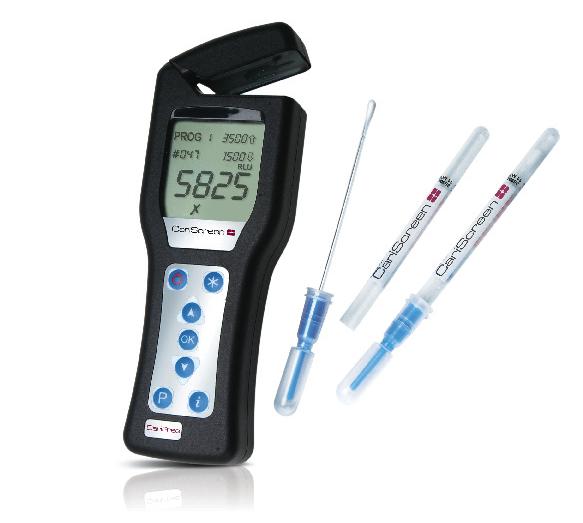
Caries risk assessment has become a standard of care in many dental offices, and the CariFree CariScreen caries susceptibility screening system is one way to determine just how high a patient’s caries risk is. The chairside testing device combines the CariScreen Meter and the CariScreen Swab to measure the ATP level in the oral biofilm. The higher the level, the higher the patient’s risk.
The swab collects samples from the teeth, and those samples go into the CariScreen testing meter. While the test shows if ATP levels are high, it doesn’t identify specific bacteria. Instead, it searches the biofilm for all aciduric/acidogenic bacteria that are known to cause dental caries.
Clinicians receive the results in seconds. The numbers that appear on the screen help provide an evidence-based risk evaluation when used alongside other key pieces of information, including the Caries Risk Assessment Form, an oral exam, and a radiographic exam. The patient’s history of decay and bacterial cultures also help provide an accurate caries diagnosis.
From collecting the sample to interpreting the results, the non-invasive system is simple to use, and the results give clinicians a reason to talk with patients about the problems that biofilm infections can cause and what they can do to treat it.
Using the system
A. Make sure the patient hasn’t had any oral activity for an hour before the test. Turn the CariScreen meter on and allow 60 seconds for it to self-calibrate. To collect the sample, swab the buccal surface of the maxillary molar (No. 3 if present) as well as the maxillary right central incisor (No. 8 if present) from mesial to distal. Do this three times each, and be sure to avoid the gingiva.
B. Put the swab back in the swab tube. Break the snap valve by bending the bulb forward and backward. Expel the liquid in the bulb down the swab shaft. Shake vigorously for 10 seconds.
C. Next, put the swab into the calibrated CariScreen meter and press the “OK” button. After 15 seconds, the numerical results will be displayed on the screen.
D. The numbers displayed on the screen will appear as RLUs, or Relative Light Units 0-9,999. Record the number in the data collection form.
{NEW_PAGE}
What the results mean:
0 to 1,500 - Low risk
1,501 to 3,500 - Moderate risk
3,501 to 9,999 - High risk
Additional Information
• One component of the CariFree caries risk-assessment, diagnosis, and treatment protocol, the CariScreen testing meter uses bioluminescence technology to measure the biofilm level
• The system produces results in real-time and can be used at chairside
• The meter is a patent-pending self-contained device